
Contact Profile Section
FluentCRM Core IntermediateYou can add your own tab to the FluentCRM contact profile page to show plugin-specific data next to the contact's details. There are two ways to do it.
Option 1: PHP hook
Write PHP only. Your callback returns HTML and FluentCRM displays it in the tab.
- No build step
- Best for simple read-only panels and small forms
Option 2: JavaScript hook
Write a Vue component. You register it as a route and it becomes a native-feeling tab.
- Needs a build step (Vite or similar)
- Best for interactive screens, lists and charts
Both ways add a tab to the same profile sidebar, so PHP and JS tabs can sit side by side. Not sure which to use? Start with the PHP hook.
Option 1: PHP hook
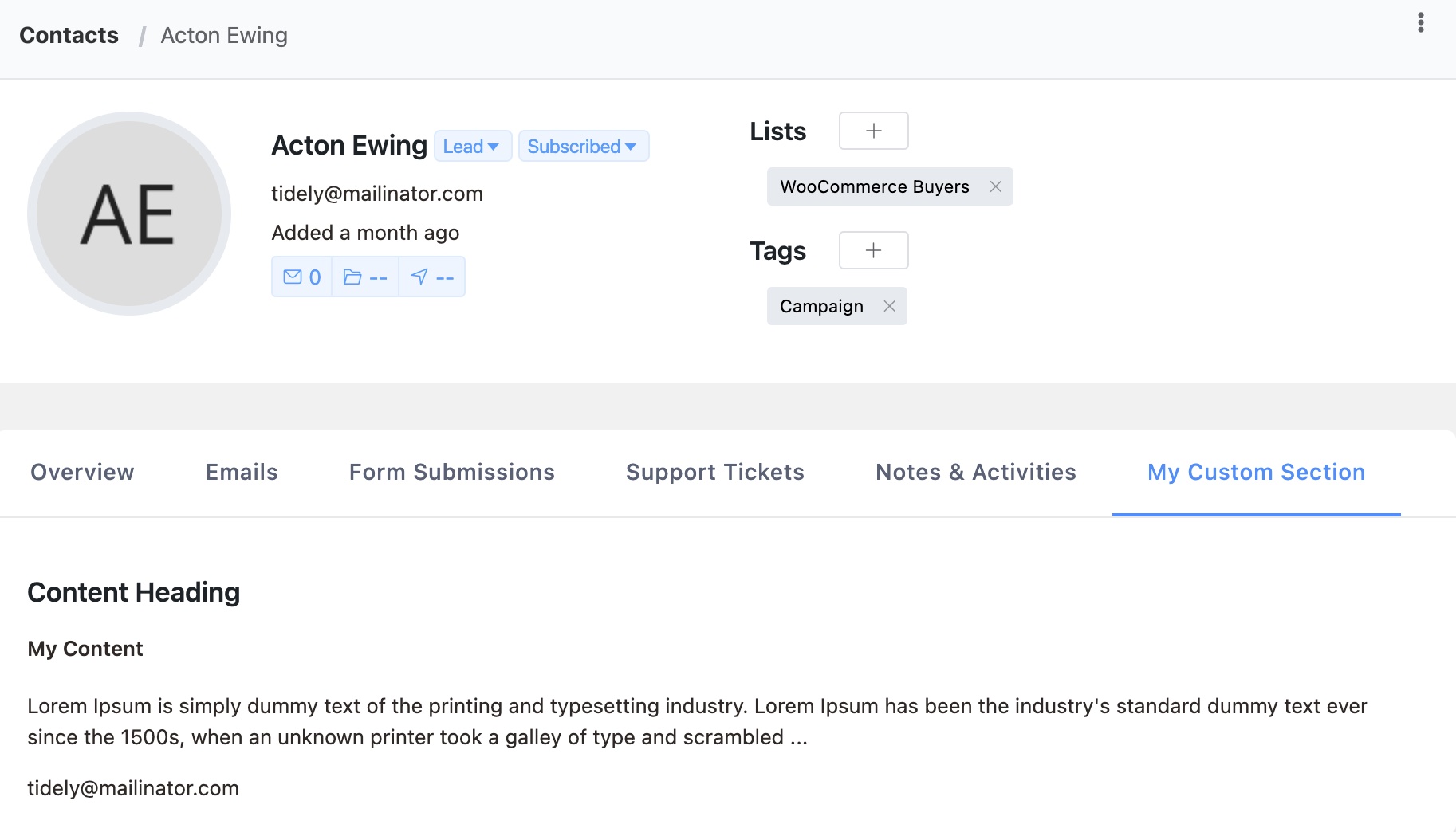
Use the Extender API. FluentCRM calls your callback when the tab is opened and shows the returned HTML.
Basic Example
add_action('fluent_crm/after_init', function () {
    FluentCrmApi('extender')->addProfileSection(
        'my_custom_section',
        __('My Custom Section', 'your-plugin'),
        function ($contentArr, $subscriber) {
            $contentArr['heading'] = 'Course Progress';
            $contentArr['content_html'] = '<div>
                <p>Email: ' . esc_html($subscriber->email) . '</p>
                <p>Courses completed: 3</p>
            </div>';
            return $contentArr;
        }
    );
});
API Reference
FluentCrmApi('extender')->addProfileSection($key, $sectionTitle, $callback, $saveCallback)
| Parameter | Type | Required | Description |
|---|---|---|---|
$key | String | Yes | Unique section identifier. Use your plugin prefix to avoid conflicts. |
$sectionTitle | String | Yes | Tab title displayed in the profile sidebar |
$callback | Callable | Yes | Renders the section content |
$saveCallback | Callable | No | Handles save requests from the section |
Render Callback
The render callback receives two arguments and must return the modified $contentArr:
| Parameter | Type | Description |
|---|---|---|
$contentArr | Array | Contains heading and content_html keys to populate |
$subscriber | Subscriber | The contact model with all properties and relations |
The $contentArr you return must include:
heading— Section heading displayed at the topcontent_html— HTML content rendered in the section body
Save Callback (Optional)
If provided, the save callback handles POST requests from your section (e.g., form submissions):
| Parameter | Type | Description |
|---|---|---|
$response | Array | Response array to return |
$data | Array | Posted form data |
$subscriber | Subscriber | The contact model |
FluentCrmApi('extender')->addProfileSection(
    'my_editable_section',
    __('My Section', 'your-plugin'),
    function ($contentArr, $subscriber) {
        $notes = get_user_meta($subscriber->user_id, 'my_plugin_notes', true);
        $contentArr['heading'] = 'My Plugin Notes';
        $contentArr['content_html'] = '<textarea name="notes">' . esc_textarea($notes) . '</textarea>';
        return $contentArr;
    },
    function ($response, $data, $subscriber) {
        if (isset($data['notes'])) {
            update_user_meta($subscriber->user_id, 'my_plugin_notes', sanitize_textarea_field($data['notes']));
        }
        $response['message'] = __('Notes saved successfully', 'your-plugin');
        return $response;
    }
);
Available Subscriber Properties
The $subscriber model provides access to all contact data:
$subscriber->email— Contact email$subscriber->first_name,$subscriber->last_name— Name fields$subscriber->status— Contact status (subscribed, pending, etc.)$subscriber->user_id— Linked WordPress user ID (if any)$subscriber->tags— Collection of assigned tags$subscriber->lists— Collection of assigned lists$subscriber->custom_fields()— Custom field values
Escape your output
content_html is rendered as raw HTML in the admin. Escape every contact-supplied value (esc_html(), esc_attr(), wp_kses_post()) before returning it, or you create a stored XSS hole.
Option 2: JavaScript hook (Vue)
Here your plugin ships its own Vue component and registers it as a child route of the contact profile. Core shows it as a tab and passes the contact to it.
It takes three pieces:
- A tab button, added in PHP with the
fluentcrm_profile_sectionsfilter. - A route, added in JavaScript with the
fluentcrm_profile_routesfilter. - A script, enqueued so it loads before the admin app starts.
1. Add the tab button (PHP)
add_filter('fluentcrm_profile_sections', function ($sections) {
    $sections['my_plugin_orders'] = [
        'name'    => 'my_plugin_orders', // must match the route name in step 2
        'title'   => __('Orders', 'your-plugin'),
        'handler' => 'route'
    ];
    return $sections;
});
The section name must be the name of the route you register in step 2. Core hides any tab whose route does not exist, so if your script fails to load the tab disappears instead of leading nowhere.
Sections appear in array order. To place yours after Emails instead of at the end, rebuild the array around the subscriber_emails key.
2. Register the route (JavaScript)
// admin/my-plugin.js
const { addFilter } = window.FLUENTCRM || {};

if (addFilter) {
    addFilter(
        'fluentcrm_profile_routes',
        'my-plugin/orders',
        (profileRoute) => ({
            ...profileRoute,
            children: (profileRoute.children || []).concat([
                {
                    name: 'my_plugin_orders',
                    path: 'orders', // resolves to #/subscribers/:id/orders
                    component: () => import('./ProfileOrders.vue'),
                    meta: {
                        parent: 'subscribers',
                        active_menu: 'contacts',
                        permission: 'fcrm_read_contacts',
                        side_path: '/subscribers'
                    }
                }
            ])
        })
    );
}
Guard on window.FLUENTCRM: it is created by core's boot script, and if that did not run there is nothing useful your script can do. Use a lazy import() for the component so it becomes its own chunk.
3. Build the component
Core renders your route inside the profile page and passes these props:
| Prop | Description |
|---|---|
subscriber | The contact object currently shown |
subscriber_id | The contact ID from the URL |
custom_fields | The site's custom field definitions |
is_full_profile_loaded | false while only basic data from the contact list is available, true once the full profile has loaded |
It also listens for an updateSubscriber event. Emit it with the updated contact after you change something, so the header and the other tabs refresh.
<!-- ProfileOrders.vue -->
<template>
    <div class="my_plugin_orders">
        <el-skeleton v-if="loading" :rows="3" animated />
        <el-table v-else :data="orders">
            <el-table-column prop="id" label="#" width="80" />
            <el-table-column prop="total" :label="$t('Total')" />
        </el-table>
    </div>
</template>

<script>
import { Rest } from '@fluentcrm/ui';

export default {
    name: 'ProfileOrders',
    props: {
        subscriber: { type: Object, required: true },
        subscriber_id: { type: [String, Number], required: true }
    },
    data() {
        return { loading: true, orders: [] };
    },
    created() {
        Rest.get(`my-plugin/contacts/${this.subscriber_id}/orders`)
            .then((response) => { this.orders = response.orders; })
            .finally(() => { this.loading = false; });
    }
};
</script>
Use the Options API, matching core. Your own REST routes need a permission check like any other, see Extending the REST API.
4. Enqueue the script (PHP)
add_filter('fluent_crm_asset_listed_slugs', function ($slugs) {
    $slugs[] = 'your-plugin'; // your plugin's folder name
    return $slugs;
});

add_action('fluentcrm_loading_app', function () {
    if (!defined('FLUENTCRM_MODULE_API') || FLUENTCRM_MODULE_API < 1) {
        return; // older core without the shared modules
    }

    wp_enqueue_script(
        'my-plugin-profile',
        plugins_url('assets/admin/my-plugin.js', YOUR_PLUGIN_FILE),
        ['fluentcrm_admin_app_boot'],
        YOUR_PLUGIN_VERSION,
        true
    );
});

// The bundle imports `@fluentcrm/*`, so it must load as an ES module.
add_filter('script_loader_tag', function ($tag, $handle) {
    if ($handle === 'my-plugin-profile') {
        $tag = str_replace('<script ', '<script type="module" ', $tag);
    }
    return $tag;
}, 10, 2);- Why
fluent_crm_asset_listed_slugs: FluentCRM screens run in no-conflict mode and drop every plugin script whose URL is not on an approved list. Without your slug the script is registered and then silently removed. - Why
fluentcrm_loading_app: it only fires on FluentCRM screens, so your script does not load on other admin pages. - Why depend on
fluentcrm_admin_app_boot: it createswindow.FLUENTCRM, and your script has to run before the app reads the route filters. - Why the
FLUENTCRM_MODULE_APIcheck: an older core has no shared modules, and your bundle would fail to resolve its imports and break the whole admin app. - Why
type="module": the import map that resolves@fluentcrm/*only applies to ES modules, and core adds the module type to its own scripts only.
Share core's Vue and UI kit
Your bundle must not ship its own copy of Vue or Element Plus. Two copies of Vue on one page break every <el-*> component, because Element Plus is installed on core's app instance. Core publishes shared modules through an import map instead. Mark these as external in your build and import them by name:
| Import | Provides |
|---|---|
@fluentcrm/vue | Vue (use in place of vue) |
@fluentcrm/element-plus | Element Plus |
@fluentcrm/element-plus-icons | Element Plus icons |
@fluentcrm/ui | FluentCRM's own helpers and components: Rest, $t, hasPermission, DataTable, PageHeader, BaseCard, Badge and more |
In Vite, map the packages to those specifiers with build.rollupOptions.external and output.paths.
Stable surface
Names exported from @fluentcrm/ui are a public API. New names can be added freely. Removals are announced with a FLUENTCRM_MODULE_API version bump, which is why the check in step 4 is worth keeping.
Hooks and filters
| Name | Where | Purpose |
|---|---|---|
fluentcrm_profile_sections | PHP (also applied in JS) | Add or reorder profile tabs |
fluentcrm_profile_routes | JS | Add child routes to the contact profile route |
fluent_crm/profile_section_{$key} | PHP | Render callback for a PHP section (set up by addProfileSection()) |
fluent_crm/profile_section_save_{$key} | PHP | Save callback for a PHP section (set up by addProfileSection()) |
fluent_crm_asset_listed_slugs | PHP | Allow your plugin's scripts on FluentCRM screens |
fluent_crm/module_import_map | PHP | Extend the import map with extra bare specifiers |
Source: app/Api/Classes/Extender.php, app/Services/Helper.php (getProfileSections()), resources/admin/createFluentCrmApp.js, resources/admin/shared/